
Written by Gad Medina (GADSTRIKE)
It has been a while since I actually tried out another mechanical keyboard. As part of WASD’s Hardware Review Team – I was given an opportunity to try out a certain mechanical keyboard that was provided by Gigaware. Having that said – we would like to thank Gigaware for providing us this wonderful specimen. Without further ado – presenting the A-JAZZ Geek AK-33 Mechanical Keyboard.

To be honest – I was actually taken aback when the package was handed over to me. I couldn’t believe that the box would be this small. I mentally conjured a list of mechanical keyboards that I came across with and vaguely remembered that in contrast to the Redragon K553-RGB Usas Mechanical Keyboard – the box size of the A-JAZZ Geek AK-33 Mechanical Keyboard is way smaller. I guess it’s safe to assume that this is definitely a tenkeyless keyboard – though for sure this is a much smaller version of the tenkeyless keyboard variant.


Also noticeable is how simple the box design is. Nothing really to see except the name and model of the keyboard at the front and A-JAZZ’s emblazoned their logo on the sides. On the back panel – A-JAZZ posted their company address along with a limited one year warranty logo at the left while the all important technical specifications of the mechanical keyboard were posted on the right portion of the back panel. While reading the technical specifications, I immediately noticed that the keyboard has been yet to be tested whether or not its totally compatible with Windows 10 – he compatibility of the A-JAZZ Geek AK-33 Mechanical Keyboard ranges from Windows XP up to Windows 8. Added to that, technical specifications did mention that the AK-33 has 82 keys which furthers my assumption that this tenkeyless mechanical keyboard is definitely smaller than the K553-RGB which happens to have roughly 87 keys.

Upon opening the box, A-JAZZ had wrapped the mechanical keyboard unit with a polyethylene-like sheet formed like an unorthodox envelope. On the top of that – the covered unit was sandwiched with Styrofoam as shown in the picture above to keep the unit in one place and providing additional protection at the end.

I removed the packed unit from the box and set it aside just to see the what else is found inside the box. Under the said packed unit was the warranty certificate of the keyboard, a keyboard cap puller, a soft tipped brush for cleaning and a routine maintenance guide.


Turning my attention to the packed unit – inside the supposed polyethylene-like sheet formed like an unorthodox envelope – is a small pack containing a removable USB cable. Am actually a fan of this, especially if you’re planning to store the keyboard for safe keeping, especially if you intend to this particular tenkeyless keyboard as a man for – say – a laptop.


Slowly, I removed the keyboard from its polyethylene-like envelope and the first thing I get to see was the backside of the AK-33. The backside of the AK-33 was sealed with plastic. Visibly, you’d notice that AK-33 has a standard feet and rubber stoppers to keep the keyboard in place. After removing the plastic seal – I was able to get to feel the glossy surface of the backside of the keyboard and although it looks like its smooth enough to let your fingers glide on it – it isn’t. The backside surface is plastic which is like the ones typically used on generic mobile smartphones.

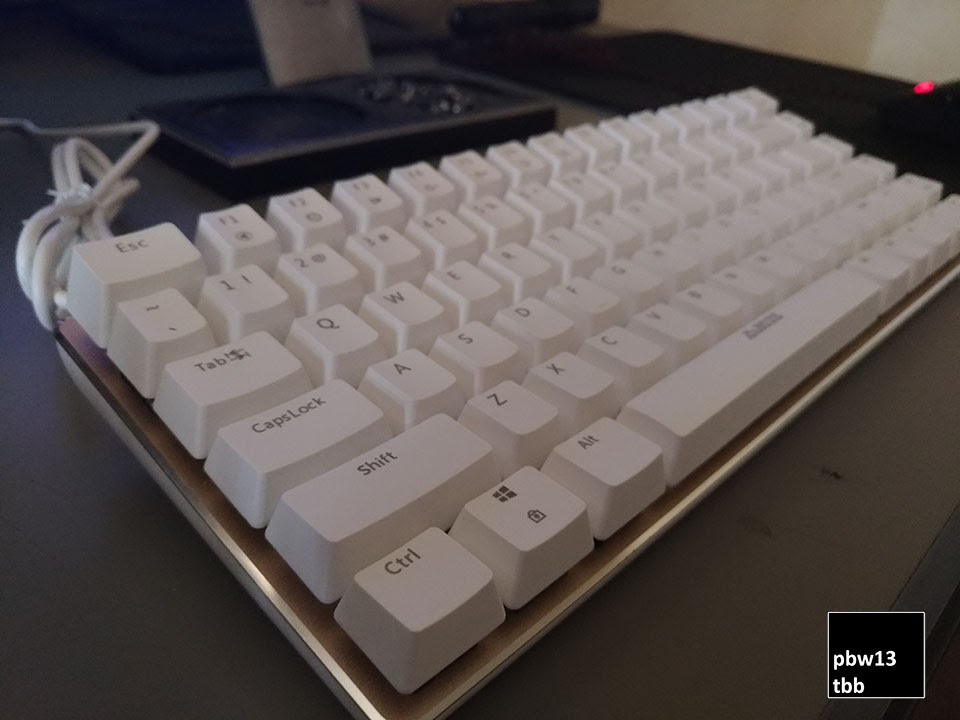
Flipping over the unit and removing its styrofoam – I couldn’t help myself from being visibly surprised since this is actually the first time I was able to get to see a tenkeyless keyboard like this one. Every crook and cranny of the keyboard – is well – keys. No space between whatsoever like on the tenkeyless keyboards – heck – even on the regular keyboards as well. Immediately, I know that it would take me a lot of time to get used to the key layout of AK-33 since it’s way too different compared to the other tenkeyless keyboards that I came across not to mention to the regular keyboards that I have come across with as well.

Looking it over on a different angle – you’d notice that A-JAZZ seems to have secured a metal plate acting out as a surface – I am guessing that plate that they used is made of aluminum. To be honest – I actually like the idea of the way how they brought AK-33 about – minimalistic – yet leaning on a professional looking streak.

At the top portion of the mechanical keyboard – there’s really nothing to see except for the USB port interface. I actually like the positioning of the USB port simply because it’s departing from the traditional placement of the interface cables which happens to be at the middle of the keyboard unit.

Before I proceed with attaching the AK-33 to my PC – I remembered that the AK-33 is a mechanical keyboard. Using the keycap puller that came with the package – I pulled one of the keycaps just to see which known mechanical switch did they use. To my surprise – it turned out that jazz produced its own mechanical black switch. I am guessing that they have probably cloned this from Cherry MX Black switches. Another worth mentioning is that this particular mechanical switch doesn’t have a LED light embedded into it which brought me to conclude that this particular A-JAZZ Geek AK-33 Mechanical Keyboard that I have doesn’t have RGB capability – which for me – happens to be a welcomed fresh air for me since I am really getting tired of seeing mechanical keyboards that has LED capability.

As I relocated myself near to my workstation – I just couldn’t help myself placing the A-JAZZ Geek AK-33 Mechanical Keyboard side by side with the Redragon K553-RGB Usas Mechanical Keyboard. You’d immediately notice that the AK-33 stand out between the two because of its key layout, its color and its size.

After taking the A-JAZZ Geek AK-33 Mechanical Keyboard to its paces – there were some few concerns that I’d like to raise. If you’re going planning to use this on your daily work routine – you need to understand that since the key layout of the AK-33 is way different compared to the usual keyboards that you have used (including the regular tenkeyless KBs that I came across with) – you’ll probably have a hard time getting use to it. There were a lot of times that I ended up pressing the wrong keys because of the adjusted layout. The location of the function button (FN) isn’t helping also and I really felt like it was causing a lot of additional headache more than convenience

While playing my favorite PC games on the other hand – the A-JAZZ Geek AK-33 Mechanical Keyboard works like a charm. This is because the A-JAZZ’s black mechanical switches really felt it was cloned from the Cherry MX black mechanical switches. For those people who aren’t aware – black mechanical switches are usually linear – therefore – you wouldn’t feel a tactile bump or an audible click whenever you’re pressing down the switches not to mention it requires more force to actuate the keys in contrast to the Cherry MX Brown/Blue switches. Because of the needed extra force actuation – in reality – it can prevent accidental key presses that might occur on less stiff switches. The downside though – if you’re going to use this one in the long run – it can be tiresome for your fingers because of the needed extra force actuation of the keys.
Now if you’re going to ask my take whether you should buy the A-JAZZ Geek AK-33 Mechanical Keyboard or not – it’s going to be difficult since it’s not a straight yes or a straight no. The thing is – I am not really a fan of linear mechanical switches (e.g. red or black mechanical switches) nor its keyboard layout and that’s what actually stopping me from recommending it. On the other hand – if you happen to have heavy fingers and you don’t mind the keyboard layout or you’re looking for a really compact tenkeyless mechanical keyboard that you can use on the run – then the A-JAZZ Geek AK-33 Mechanical Keyboard is definitely your guy. As of this writing (5/2/2018) – the A-JAZZ Geek AK-33 Mechanical Keyboard is only Php 1349. Get yours now through Lazada by clicking HERE.
 THE BARGEYN BEEN